






Looking for a fast way to remove redundant files from your Soundminer database or your collection of sounds? Award-winning sound designer Tim Farrell has got you covered! He developed the SMDB Companion (Soundminer Database Companion) app that makes it easy to find and remove duplicate files. Here, he shares his inspiration for creating the SMDB Companion, explains how it works, shares different ways to narrow searches, offers tips on useful features, and more!
 New ReleaseNOVA by Mattia CellottoWATCH VIDEO →
SMDB Companion Overview | Tim Farrell
Can you give a brief description of SMDB Companion (Soundminer Database Companion) and how it’s helpful for sound editors?

Tim Farrell (TF): SMDBC is a tool designed to help sound editors clean up their Soundminer databases. Mainly, it’s a duplicate finder. It helps editors find and remove duplication from their libraries, but it can also help identify files you simply want to remove for a variety of reasons.
It can be hard for an editor to find time to go through and clean up their personal sound libraries, especially if there are hundreds of thousands or even millions of files. SMDBC is designed to help automate and speed up this process so editors can quickly find the sounds they are looking for without having to wade through a bunch of duplicates.
A sound editor’s library is the cornerstone for their workflow. Knowing this, SMDBC is designed with several safeguards in place to be non-destructive out of the gate and to protect the user’s current library database and audio files.
You do have the option to take the guard rails down, but if you’re nervous about making changes to your library because of data loss, SMDBC has you covered.
What about sound editors who don’t use Soundminer to manage their libraries? Can they use SMDBC to clean up their databases?
TF: Well, first of all, I highly suggest you pick up a copy of Soundminer. It is truly an indispensable tool. In addition to being an amazing way to organize my sound library, it’s also an incredible playground for sound creation, design, and manipulation. I probably spend as much time using Soundminer as I do Pro Tools in my editing process.
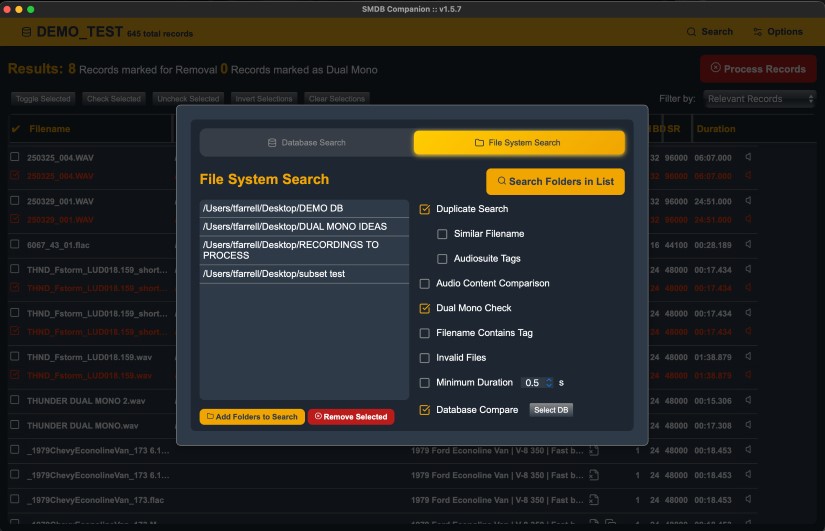
But, if you don’t use Soundminer, in addition to the main database search, there is also a mode that allows you to create a list of folders and recursively scan the audio files inside them. This completely bypasses any involvement with a database and is useful for editors who want to quickly search a group of files without creating a database first, such as a complete show backup they want to add to their library. And, of course, it can also be used to fully scan a library folder and do a full-scale cleanup the same way the main database search works.
What went into the development of SMDBC? What was your catalyst for creating this tool?
TF: It just came from a place of personal need. I mean, some duplication in your library isn’t really a big deal, and it can even be helpful sometimes, but at some point, it can start to feel like it’s getting in the way and taking up unnecessary space on your library drive.
I do my best to keep my personal sound library organized, but when I get to the end of a show, the last thing I want to do is spend a chunk of time going through all my show files and figuring out which ones are helpful. So, often I’ll just dump my show library and a bunch of my raw ‘Audio Files’ folders directly into my library with the hope that someday I’ll go through it all. Of course, I never do. I’m either working and don’t have time to do it, or I’m not working, and it just feels like the last thing I wanted to do.
When things slowed down during the recent strikes, I thought maybe it might be a good time to give my library some attention, yet when I sat down in front of it, the task seemed monumentally impossible. I have about 950,000 files in my personal sound effects library, and try as I might, I just do not have the patience to go through that many records. And then I had an epiphany…
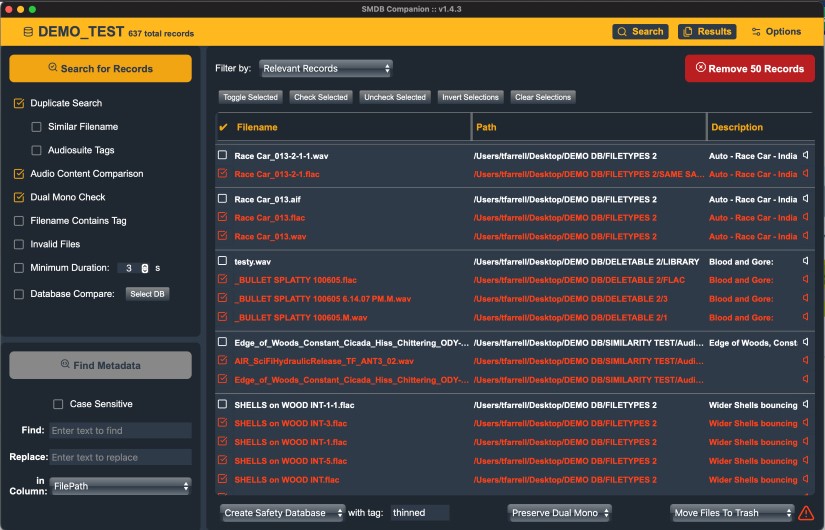
You’ve included great ‘Options’ for ‘Duplicate Match Criteria’ to narrow down the duplicates, like ‘Show Name’ and ‘Manufacturer.’ (There are actually 90 different options in the list!) You can get very specific with a duplicate search and what sound files it’ll search for. Any tips for users on making the most of these combinations?
TF: The fewer items you add to the match list, the more matches you’ll get. That can be a good or bad thing depending on what you want. I often just set it to ‘Filename’ to get more matches and then use ‘Preservation Priority’ to help ensure the best file is being chosen to keep. But the default settings are a little more conservative.
As far as the number of options it gives, it takes all the metadata fields from your Soundminer database to create the list of choices. That way, if you have custom metadata fields in your database, they can be incorporated as options, too.
They really are just there to give you the freedom to be as specific as you want. ‘Show Name’ would be helpful if you want to make sure each show contains no duplicates, but you don’t mind if there are duplicates from show to show.
‘Library’ is another useful one. It will check each of my libraries separately for duplicates within the libraries, and then it will look for duplicates within one large group of all my shows because they don’t have a metadata entry for Library in my database.
But these options are only as good as your metadata. If you’re going to explore them, I strongly suggest opening up your Soundminer database and making sure those columns are completely filled out the way you want. Soundminer has a great tool called ‘Workflows’ that can help automate filling out your metadata.
What about rearranging, adding, or removing criteria in the ‘Preservation Order’? What are some things to keep in mind here?
TF: ‘Preservation Order’ is how SMDBC decides which files to keep and which files to mark as duplicates, and I would say it is one of the most important parts of the program.
The whole idea of SMDBC is that you don’t have time to go through all your sounds and decide which ones to keep, so it’s essential to take the time to really dial this in to best suit your personal library organization structure. You might have to run a few searches and change the Preservation Order a few times until you are happy. But once you get it set up in a way you fully trust, it means you can run it on your library and not have to spend hours manually checking all the results to thin out your database.
So basically, the way it works is the program generates groups of files it thinks are duplicates and then goes down that list in order to decide which ones to keep. The most important things are at the top of the list. So, for me, I have a folder that I keep all my personal sound recordings in. This is the most important thing in my library to me, so I put that folder’s name at the top of my list so that if any of my recordings show up in a possible duplicate list, they will be selected as the file to keep from that group.
It uses the same database metadata options we talked about in the ‘Match Criteria’ to give the user maximum flexibility to really create a list that caters to their specific libraries and needs.
Also, if you are curious to see what my actual settings are that I use for my library, you can load the TJF preset, but the default settings are a good starting point.
The ‘Audio Content Search’ Option is really cool. So, if you have the same sound but you’ve labeled it differently, then SMDB will find those duplicates! Any tips for using this feature?
TF: I would certainly recommend running the ‘Audio Content Search’ after you’ve spent some time cleaning up your library with the regular duplicate search first. ‘Audio Content Search’ needs to look at every file in your database and generate an audio fingerprint that it uses for comparison. This process can take a while. So, the fewer records it has to scan, the better. I guess my other advice would be to run it at night when you are done for the day.
The good news is that it saves the fingerprints it generates into your database, so once you’ve done it once, any audio content search afterwards will be as fast as the other searches. Also, it saves to the database as it goes, so if you need to stop it for some reason, you can pick back up relatively close to where you left off.
Also, if you go into the ‘Options’ menu, you’ll see ‘Audio Content Search’ has two algorithms to choose from, ‘Exact’ and ‘Relative.’ ‘Exact’ will help you find files that are identical but have different names. ‘Relative’ will do that too, but also help you find files that are similar in their content. There’s a threshold setting that allows you to play with how close they need to be in order to be considered a match.
This is useful for finding files that are perhaps remastered versions of older files. It’s also useful if you find a great sound and want to see if there’s anything similar in your library.
Can you tell me about ‘Dual Mono’ Search?
TF: ‘Dual Mono’ Search is for the hardcore library space savers. Back when sound libraries went to CD, they would take mono sound effects and put the same mono sound on both the left and right channels. Then, when CD libraries were digitized to audio files and put on servers, they just stayed that way. So there are very likely a bunch of stereo files in your library where each channel is identical.
‘Dual Mono’ search will look at all your audio files that have more than one channel and compare them all to make sure they are different. There’s also a little conversion tool built in that will take any identified dual or multi-mono files and remove the extra channels.
Also, like the fingerprinting, it takes time to look at every file, so run this one at night, too. However, like the fingerprinting, it also saves the results to the database as it goes, in case you get interrupted.
Permanently removing files will make anyone pause. Can you talk about the different warnings that pop up or are displayed before a user ‘hits the big red button’ to remove files? (The default mode has: ‘Options’ down down menu with ‘Create Safety Database’ checked, as well as ‘Audio Files’ ~ ‘Keep on Disk’ checked. Can you explain what happens to duplicate files in this default mode?)
TF: In default mode, when it comes time to remove records/files, it will make a duplicate copy of your database and do all of its record removal in the newly created copy. It will then completely leave all of your actual library audio files alone.
To me, the safest way to use the program is to keep it in this default mode and thin out all your duplicates in the new safety database copy. Then, when you are happy with it, open the thinned safety database in Soundminer and use the ‘Mirror’ function to create a new copy of your library without your duplicates. You can then back up your old library with dupes somewhere and keep it around just in case — because that’s just what we do.
But some people like to live a little more dangerously, and work directly in their database and remove files as they go, so you have those options too, but they come with plenty of warnings to try to prevent you from shooting yourself in the foot by accident.
I also recently added a safe folder list. Anything in a folder marked as safe will be completely ignored during searches and will not show up in the results.
The overview video and the manual are good places to start when first working with SMDBC. If questions arise that aren’t covered there or in the FAQs, where can users go for answers?
TF: The overview video is really the best place to start. I try to go over every feature in the program and give little talking points and advice about them. There have been a few updates since the version I used in the video, so I might find myself making an updated one soon.
I’ve worked hard to make the UI as intuitive and clear as possible, but if you’ve watched the overview video and still have some questions, there’s a contact email on the SMDBC website as well.
Any future updates on the horizon for SMDBC?
TF: I just put out another update this morning! Users have been asking to make the results sortable by clicking on the headers, so that went out today, as well as a couple of other bug fixes and some UI things.
There’s also the new File System Search I mentioned earlier, which lets you search for duplicates without the need for a database, and I’m currently beta testing an update that will provide the ability to support interacting with server databases to help librarians manage their facility libraries.
And of course, when I get feature requests, I do my best to implement them, so if something is bugging you or there’s something you’d like to see, please reach out.
A big thanks to Tim Farrell for giving us a behind-the-scenes look at SMDBC and to Jennifer Walden for the interview!